| |
| |
|
|
| |
|
|
| |
|
24-bit/96kHz Laptop DI
|
| |
 |
| |
|
|
| |
|
|
|
|
|
|
 |
What is the Press saying about AxePort Pro?
|
|
|
|
 |
| by Mike Metlay, Recording
Magazine
The AxePort Pro installed instantly and worked perfectly on
every Windows and Mac computer on which it was tested. It simply
showed up as an available device and was immediately accessible
by my DAW software.
...it sounded fantastic. I'm guessing it uses the same excellent-sounding
D/A converters found on the MicPort Pro, which sat me back on my
heels with the unexpected quality it gave my headphone monitoring...
So there you have it: clen and clear input, clean and clear output,
no drivers to install, and it fits in your pocket. If you want to
be able to capture guitar licks any time you have your computer
with you — and listen to music at high resolution even when
you're not playing guitar —look in into the AxePort Pro. Another
winner from CEntrance.
|
|
|
|
 |
| by Patrick Wong, Guitar
Player Magazine
With 24-bit/96kHz performance, you can record with professional-grade
clarity, and AxePort Pro also offers a unique"wet/dry"
slider (which appears in the software control panel for Mac and
Windows) that lets you mix the "dry" zero-latency input
signal with the "wet" return from your DAW (including
the effects plug-ins).
KUDOS Very easy to use. WindowsXP/Vista and Mac OS X compatibility.
USB powered. Rugged solid-metal casing. CONCERNS None.
|
|
|
|
 |
| by Brian
Fox, Bass Player Magazine
Having recorded countless home demos with friends, I'm no stranger
to some of the techniques and technologies involved in the craft.
But given the choice, I'd happily focus on playing to leave the
tweaking to those more suited. So when the CEntrance AxePort Pro
came across my desk, I confess, I felt a little flummoxed. As it
turns out, this little blue bugger might have triggered a shift
in my priorities.
This bus-powered interface is awfully simple. Plugging into a MacBook's
USB port powered the unit and hooking up bass and headphones turned
it into a teeny-winy practice amp, allowing me to hear minute details
of my tone and touch. In no time I was ready to lay down some tracks.
|
|
|
|
 |
by Steven Stone, Vintage
Guitar
With several instruments including electric and acoustinc guitars,
the AxePort Pro's signal was strong and clean. It works nicely
as a practice tool using its headphone output, and the dry headphone
mix lets you know exactly how clean you are playing.
Combine an AxePort Pro and MicPort Pro with a decent microphone
and a you'll be equipped to make professional-level recordings.
|
|
|
|
 |
by Paul White, Sound On
Sound
The World's Best Music Recording Magazine
Using the AxePort Pro is as simple as it appears: you install the
software, plug it in, select as the active hardware on your DAW
and start recording. The headphone output is plenty loud enough,
and the input has more than enough gain range to handle any type
of pickup in normal use. It's also quiet enough to make serious
recordings. When you are done, everything can be packed into
the included velvet pouch and then easily stored in your guitar
case or with your laptop.
This is a typical CEntrance product — it's elegant, simple
and does exactly what it claims.
|
|
|
|
 |
by Andy Hong, TapeOp
The Creative Music Recording Magazine
The charm of this DI is that you can record guitar, bass or anything
with an instrument-level signal straight into your laptop. Zero-latency
monitoring is built-in. Once installed on Win XP/Vista or Mac OS10.4+,
a control panel allows you to determine how much "dry"
signal (which bypasses all host buffers) is fed back to the headphones.
With Nuendo/Cubase 4.2 runinng on my XP-equipped subnotebook, I
was able to dial down the latency of the CEntrance ASIO driver's
"wet" signal to 5ms at 44.1kHz — impressive. Input
impedance i very high at 1M Ohm, so you shound't have any problems
with most pickups. Sound quality is very high... For recording
instruments directly into your laptop, the AxePort Pro is the easiest
to use and most portable solution that I've seen.
|
|
|
|
 |
| by Dan
Berkowitz, Premier Guitar
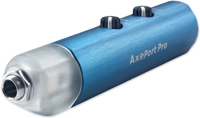
The AxePort Pro is small, portable and delivers great sound.
This is a sleek little gizmo, packing the essentials of a low noise,
high quality (96khz, 24 bit), single-channel computer interface
for guitar into a blue aluminum tube just 4.5” long and about
an inch around.
To try out the AxePort Pro, I got out my 1981 G&L L-1000 bass
and hooked up to my MacBook. The sound? Full, clear, true –
no clipping or distortion, even through meager iPod earbuds. The
bottom end was rich sounding with a nice punch to it. It was just
what I’d love to hear for practicing. Plenty of volume, too.
I was really pleased with how good my recorded bass sounded –
no problems with latency while playing along with a GarageBand drum
track, even with a couple of effects added in. I also found that
by setting my Mac’s Sound Preference input and output to the
AxePort Pro, I could play along with songs in iTunes – a really
handy way to learn a new song or for practicing late at night.
|
|
|
|
 |
| by Graham
Barlow, Mac Format UK
Plug your guitar into your Mac and start recording, with this portable
USB box. Portable, stylish and swish — the AxePort Pro
is a great way to record guitar on your Mac... Essential device
if you want professional results recording guitar on your Mac.
|
|
|
|
 |
| by Mitch
Gallagher, Grammy Award winner
AxePort Pro may be the easiest way yet to get an electric guitar
or bass into your computer! ...the key is the little AxePort
Pro Control Panel. It has a slider, allowing you to listen to the
zero-latency signal that is passing through the AxePort or to monitor
the signal coming through your DAW software, which will likely allow
you to use a virtual amplifier plug-in to process the signal but
will also likely have noticeable latency. Using the slider, you
can blend between the direct AxePort signal and the DAW output signal
to balance amplifier tone, with low latency.
In practice it works like a charm. The AxePort does a good job
as a DI/interface. The headphone out has plenty of power. And it's
so simple to use! If you're recording electric guitar or bass, then
you need to check out the AxePort Pro. It's about the easiest, fastest
way to get your axe recorded, with great sound quality to boot.
|
|
|
|
 |
| by Doren Sean Michael,
HITS TV show
The actual device is small, attractively packaged, really well
made and has a snazzy blue professional look to it. I also loved
the included pen drive that they give you to install what's necessary
to use the AxePort on either Windows or Macintosh.
The software, which also has some guitar effects, took mere seconds
to install. Afterward, I merely plugged the included USB cable into
the laptop. In my case, I opened Apple's GarageBand and plugged
a regular ¼" guitar cord into the end of the AxePort.
There are two small volume knobs on the device. One of them controls
the amount of signal going into the computer and the other one controls
the output to a small 1/8" mini jack, to which I connected
a pair of my iPod speakers. The sound was great and I was really
impressed with how strong and clear the signal from my guitar was!
|
|
|


 Reviews